

Forget the sprawling, multi-tabbed dashboards you have seen. An effective marketing dashboard is not a data repository; it is an opinionated, focused tool designed to answer one critical question: “What should we do next?”
Most dashboards are digital graveyards, cluttered with vanity metrics that make people feel busy but tell them nothing of value. This is not a guide about which buttons to click in a BI tool. It is the strategic framework for building a dashboard that forces action, eliminates ambiguity, and aligns your marketing directly with business outcomes.

The fatal flaw of most marketing dashboards
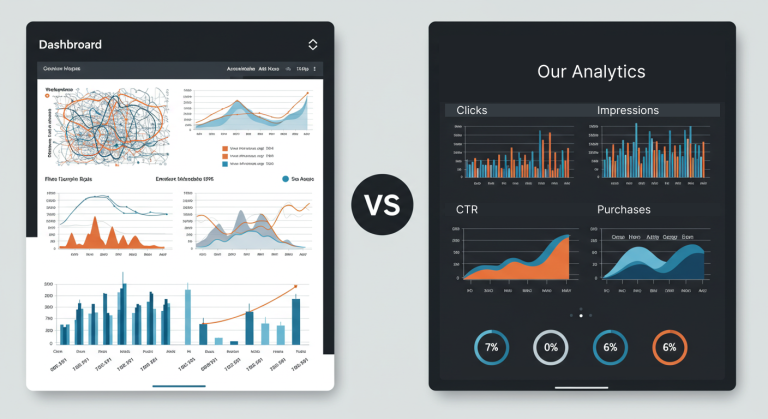
The default approach to building a dashboard is fatally flawed. It begins with the question, “What data can we show?” This leads to a process of “data vomiting,” where every available metric is crammed onto a single screen. The result is a visually impressive but functionally useless collage of numbers.
The core problem is the confusion between vanity metrics and actionable metrics.
Vanity metrics
These metrics make you look good but offer no insight into strategy. Think impressions, page views, follower counts, or likes. A spike in impressions is meaningless if it does not correlate to a change in revenue or leads. These numbers describe activity, not results.
Actionable metrics
These metrics directly reflect business reality and link your actions to outcomes. They provide the basis for decisions. Think customer acquisition cost (CAC), customer lifetime value (CLV), and marketing-qualified lead (MQL) to sales-qualified lead (SQL) conversion rate. Learn why focusing only on conversion rate can be a mistake.
Consider a dashboard that proudly displays “5 million impressions.” What do you do with that information? Now, consider one that displays “Customer Acquisition Cost by Channel.” You see that Google Ads costs $50 per customer while LinkedIn Ads costs $250. That single visualization provides an immediate, actionable insight.
First principles: start with questions, not metrics
Building an effective dashboard does not start with data. It starts with strategy. Before you connect a single API, answer these questions with absolute clarity:
What is the primary business objective right now? This must be a specific, quantifiable business goal, like reducing customer churn by 5% this quarter.
How does marketing directly contribute to that objective? Draw a direct line from marketing activities to the business goal. For example, marketing will run engagement campaigns for customers at risk.
What one or two questions must this dashboard answer to track that contribution? This is the most crucial step. You are defining the core questions, not the metrics.
For a business objective of increasing e-commerce profitability, the critical questions for the dashboard might be:
Which marketing channel provides the best CAC to CLV ratio?
How is our paid media ROAS trending week-over-week?
This question-first approach ruthlessly filters out the noise and ensures every element on your dashboard serves a strategic purpose.
A framework for selecting your KPIs: leading vs. lagging indicators
Once your core questions are defined, you can select the Key Performance Indicators (KPIs) to answer them. A robust marketing dashboard balances two types of indicators.
Lagging indicators are output-oriented. They measure past success (e.g., revenue, CLV) and tell you if you achieved your goal.
Leading indicators are input-oriented. They measure activities that drive future success (e.g., demo bookings, trial sign-ups) and predict if you are on track to achieve your goal.
A dashboard with only lagging indicators is a report card. A dashboard with only leading indicators can create a false sense of security. You need both.
KPIs for a SaaS business
Business Question: Are we growing sustainably?
KPIs: Monthly Recurring Revenue (MRR), Customer Churn Rate, CLV to CAC Ratio, Lead-to-Trial Conversion Rate, Trial-to-Paid Conversion Rate.
KPIs for an e-commerce business
Business Question: Are we profitably acquiring and retaining customers?
KPIs: Return on Ad Spend (ROAS) by channel, Average Order Value (AOV), Shopping Cart Abandonment Rate, Conversion Rate by traffic source, Repeat Customer Rate.
KPIs for a B2B lead generation business
Business Question: Is marketing supplying sales with high-quality opportunities?
KPIs: Number of MQLs, MQL-to-SQL Conversion Rate, Cost per SQL, Sales Cycle Length, Pipeline Velocity.
The technical stack: tools for building your dashboard
With a clear plan, you can approach the technology. The stack consists of three layers.
1. Data sources
These are the platforms where your raw data lives, such as Google Analytics 4, Salesforce, Google Ads, HubSpot, and your own backend databases.
2. Data integration (ETL)
You need a way to extract, transform, and Load (ETL) data from these disparate sources. This can be done with native connectors in BI tools, third-party connectors like Supermetrics or Fivetran, or a dedicated data warehouse like Google BigQuery for ultimate control.
3. BI & visualization tools
This is where the dashboard comes to life.
Beginner-Friendly: Looker Studio (formerly Google Data Studio) is the best free starting point.
Powerful & Scalable: Tableau and Microsoft Power BI are the industry leaders for enterprise use.
All-in-One Platforms: Databox or Geckoboard offer easy-to-use interfaces and pre-built integrations.
The choice of tool is less important than your strategic framework.
The science of visualization: designing for instant insight
How you display data is as important as the data itself. The goal is to provide instant insight and reduce cognitive load.
Embrace the data-ink ratio
Pioneered by Edward Tufte, this concept demands that you remove visual clutter. Eliminate chart borders, gridlines, background colors, and 3D effects. Every pixel should serve a purpose—Edward Tufte’s principles of data visualization.
Establish a clear visual hierarchy
The most important KPI must be the most prominent. Use size and position to guide the user’s eye from top-level metrics down to supporting charts.
Choose the right chart for the job
Trend over time: Line chart.
Compare categories: Bar chart.
Part-to-whole: Stacked bar chart (avoid pie charts).
Progress to goal: Bullet chart.
Use color with intention
Color should convey information, not be decorative. Use neutral colors for data and a single bright color to highlight a key insight or use conditional formatting (red/green) to show performance against a target.
From static report to dynamic decision engine
A great dashboard is an interactive tool for exploration.
Incorporate segmentation and filtering
The ability to filter the entire dashboard is critical. A date range controller is mandatory. Add filters for key dimensions like marketing channel, region, device, or customer segment. This allows a user to move from a high-level view to a specific insight.
Iteration is mandatory
A dashboard is never finished. Schedule a formal review every quarter with stakeholders. Ask the hard questions: Is this still helping us make decisions? Are we answering the right questions? What can we remove?
Your dashboard is complete not when there is nothing left to add, but when there is nothing left to take away. Stop building data museums and start building decision engines.